Fake BitDefender 2011
21 APRIL 2011
Overall Risk Level:
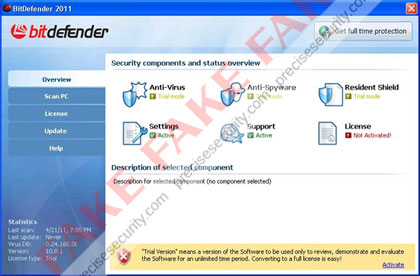
Fake BitDefender 2011 is a misleading security software that will mimic the legitimate program in order to deceive computer users. Sometimes called as the Fake Bit Defender 2011 virus, this one was included in the lists of rogue security applications that were created specifically to be sold via unfair marketing method. The real BitDefender 2011 can be downloaded from bitdefender.com web site and must be installed manually, while the rogue one’s will be dropped on to computers and be installed without users consent. Also the legitimate one is offered in two variants namely BitDefender Antivirus Pro, BitDefender Total Security 2011 and BitDefender Internet Security 2011. These variants offers different levels of protection.
It is good to know that fake BitDefender 2011 can penetrate a computer without being detected. This is because it uses a technique that will hide itself on the system by injecting a code on legitimate Windows process. A Trojan is also responsible why the fake BitDefender 2011 can manipulate a system without hindrance from any security applications installed. Modifications can be performed on the registry that will allow itself to run when Windows is started. Removing BitDefender 2011 virus is the best idea to prevent further harm it may cause to compromised computer. Use only legitimate anti-malware programs to scan the computer and remove fake BitDefender 2011 together with all the files residing on the system.
Screen Shot Image:
Alias: Bit Defender 2011
Damage Level: Medium
Systems Affected: Windows 9x, 2000, XP, Vista, Windows 7
BitDefender 2011 Virus Removal Procedures
Manual Removal:
1. Press Ctrl+Alt+Del on keyboard to stop process associated to “BitDefender 2011″. When Windows Task Manager opens, go to Processes Tab and find and end the following process:
(random characters).exe
1. Press Ctrl+Alt+Del on keyboard to stop process associated to “BitDefender 2011″. When Windows Task Manager opens, go to Processes Tab and find and end the following process:
(random characters).exe
2. You need to update your installed antivirus application to have the latest database.
3. Thoroughly scan the computer and any detected threats must be removed. If removal is prohibited, it is best to quarantine the infected item. Manually locating and deleting of malicious files should also be performed. Please see files below that are related to BitDefender 2011 Virus.
4. Registry entries created by BitDefender 2011 must also be remove from the Windows system. Please refer below for entries associated to the rogue program. [how to edit registry]
5. Exit registry editor.
6. Get rid of BitDefender 2011 start-up entry by going to Start > Run, type msconfig on the “Open” dialog box. A windows containing System Configuration Utility will be launched. Go to Startup tab and uncheck the following Start-up item(s):
(random characters).exe
3. Thoroughly scan the computer and any detected threats must be removed. If removal is prohibited, it is best to quarantine the infected item. Manually locating and deleting of malicious files should also be performed. Please see files below that are related to BitDefender 2011 Virus.
4. Registry entries created by BitDefender 2011 must also be remove from the Windows system. Please refer below for entries associated to the rogue program. [how to edit registry]
5. Exit registry editor.
6. Get rid of BitDefender 2011 start-up entry by going to Start > Run, type msconfig on the “Open” dialog box. A windows containing System Configuration Utility will be launched. Go to Startup tab and uncheck the following Start-up item(s):
(random characters).exe
7. Click Apply and restart the computer.
BitDefender 2011 Removal Tool:
In order to completely remove the threat from a computer, it is best to download and run Malwarebytes Anti-Malware. Sometimes, Trojans will block the downloading and installation of MBAM. If this happens, download it from a clean computer and rename the executable file before executing on the infected computer.
In order to completely remove the threat from a computer, it is best to download and run Malwarebytes Anti-Malware. Sometimes, Trojans will block the downloading and installation of MBAM. If this happens, download it from a clean computer and rename the executable file before executing on the infected computer.
Using Portable SuperAntiSpyware:
To thoroughly clean a computer, it is best to do a separate scan of another security program so that other infected files not detected by anti-virus application can be remove as well. Download and runSuperAntiSpyware Portable Scanner.
To thoroughly clean a computer, it is best to do a separate scan of another security program so that other infected files not detected by anti-virus application can be remove as well. Download and runSuperAntiSpyware Portable Scanner.
Technical Details and Additional Information:
Malicious Files Added by Fake BitDefender 2011:
c:\Program Files\BitDefender 2011\
c:\Program Files\BitDefender 2011\bitdefender.exe
c:\Documents and Settings\All Users\Start Menu\BitDefender 2011\
c:\Documents and Settings\All Users\Start Menu\BitDefender 2011\BitDefender 2011.lnk
%AllUsersProfile%\Start Menu\BitDefender 2011\Uninstall.lnk
%UserProfile%\Desktop\BitDefender 2011.lnk
%Temp%\srvED4.ini
%Temp%\srvED4.tmp
c:\Program Files\BitDefender 2011\
c:\Program Files\BitDefender 2011\bitdefender.exe
c:\Documents and Settings\All Users\Start Menu\BitDefender 2011\
c:\Documents and Settings\All Users\Start Menu\BitDefender 2011\BitDefender 2011.lnk
%AllUsersProfile%\Start Menu\BitDefender 2011\Uninstall.lnk
%UserProfile%\Desktop\BitDefender 2011.lnk
%Temp%\srvED4.ini
%Temp%\srvED4.tmp
Fake BitDefender 2011 Registry Entries:
HKEY_CURRENT_USER\Software\MonEC2
HKEY_USERS\.DEFAULT\Software\Microsoft\Windows\CurrentVersion\Internet Settings “ProxyEnable” = ‘0′
HKEY_CURRENT_USER\Software\Microsoft\Windows\CurrentVersion\Run “BitDefender 2011″ = ‘C:\Program Files\BitDefender 2011\bitdefender.exe’
HKEY_LOCAL_MACHINE\SOFTWARE\Microsoft\Windows NT\CurrentVersion\Image File Execution Options\chrome.exe “Debugger” = ‘msiexecs.exe -sb’
HKEY_LOCAL_MACHINE\SOFTWARE\Microsoft\Windows NT\CurrentVersion\Image File Execution Options\firefox.exe “Debugger” = ‘msiexecs.exe -sb’
HKEY_LOCAL_MACHINE\SOFTWARE\Microsoft\Windows NT\CurrentVersion\Image File Execution Options\iexplore.exe “Debugger” = ‘msiexecs.exe -sb’
HKEY_LOCAL_MACHINE\SOFTWARE\Microsoft\Windows NT\CurrentVersion\Image File Execution Options\opera.exe “Debugger” = ‘msiexecs.exe -sb’
HKEY_LOCAL_MACHINE\SOFTWARE\Microsoft\Windows NT\CurrentVersion\Image File Execution Options\safari.exe “Debugger” = ‘msiexecs.exe -sb’
HKEY_LOCAL_MACHINE\SOFTWARE\Microsoft\Windows\CurrentVersion\Internet Settings\5.0\User Agent\Post Platform “WinNT-EVI 21.04.2011″
HKEY_CURRENT_USER\Software\MonEC2
HKEY_USERS\.DEFAULT\Software\Microsoft\Windows\CurrentVersion\Internet Settings “ProxyEnable” = ‘0′
HKEY_CURRENT_USER\Software\Microsoft\Windows\CurrentVersion\Run “BitDefender 2011″ = ‘C:\Program Files\BitDefender 2011\bitdefender.exe’
HKEY_LOCAL_MACHINE\SOFTWARE\Microsoft\Windows NT\CurrentVersion\Image File Execution Options\chrome.exe “Debugger” = ‘msiexecs.exe -sb’
HKEY_LOCAL_MACHINE\SOFTWARE\Microsoft\Windows NT\CurrentVersion\Image File Execution Options\firefox.exe “Debugger” = ‘msiexecs.exe -sb’
HKEY_LOCAL_MACHINE\SOFTWARE\Microsoft\Windows NT\CurrentVersion\Image File Execution Options\iexplore.exe “Debugger” = ‘msiexecs.exe -sb’
HKEY_LOCAL_MACHINE\SOFTWARE\Microsoft\Windows NT\CurrentVersion\Image File Execution Options\opera.exe “Debugger” = ‘msiexecs.exe -sb’
HKEY_LOCAL_MACHINE\SOFTWARE\Microsoft\Windows NT\CurrentVersion\Image File Execution Options\safari.exe “Debugger” = ‘msiexecs.exe -sb’
HKEY_LOCAL_MACHINE\SOFTWARE\Microsoft\Windows\CurrentVersion\Internet Settings\5.0\User Agent\Post Platform “WinNT-EVI 21.04.2011″
Thanks to http://www.precisesecurity.com



 . Sometimes, Trojans will block the downloading and installation of MBAM. If this happens, download it from a clean computer and rename the executable file before executing on the infected computer.
 Power Eraser.