Tuesday, March 29, 2011

W32.Mabezat.B


Overall Risk Level: 
W32.Mabezat.B can infect executable files and encrypt data files. W32.Mabezat.B worm spreads via removable drives and unsecured network shares. It will also modify Windows registry settings to disable certain functionalities.

Alias:
§  Worm.Win32.Mabezat.b
§  W32/Mabezat
§  PE_MABEZAT.B-O
§  W32/Mabezat-B
Damage Level: Low
Systems Affected: Windows
Manual Removal of W32.Mabezat.B
1. Temporarily Disable System Restore (Windows Me/XP). [how to]
2. Update the virus definitions.
3. Reboot computer in SafeMode
 [how to]
4. Run a full system scan and clean/delete all infected file(s)
5. Delete/Modify any values added to the registry. On Start Menu, click
 Run, type regedit on the field.
Navigate to and restore the following registry entry if required:
HKEY_CURRENT_USER\Software\Microsoft\Windows\Current Version\Explorer\Advanced\”ShowSuperHidden” = “0″
6. Exit registry editor and restart the computer.
7. Find and delete the following files:
- %SystemDrive%\Documents and Settings\tazebama.dl_
- %SystemDrive%\Documents and Settings\hook.dl_
- %UserProfile%\Start Menu\Programs\Startup\zPharoh.exe
- %SystemDrive%\Documents and Settings\tazebama.dll
- [DRIVE]:\zPharaoh.exe
- [DRIVE]:\autorun
8. In order to make sure that threat is completely eliminated from your computer, carry out a full scan of your computer using AntiVirus and Antispyware Software. Another way to delete the virus using various Antivirus Program without the need to install can be done with Online Virus Scanner.
 Favorable Thanks to http://www.precisesecurity.com

Friday, March 18, 2011

System Tool

System Tool

Overall Risk Level: This entry has a rating of 2
System Tool also called as the SystemTool 2011 virus is another deadly and widely-spread rogue security program in the making. A Trojan that is capable of penetrating a system by taking advantages of software and system vulnerabilities is being utilized to expand its contamination to as many computer as it can. When first hit with a System Tool virus, common symptoms may include browser redirects, homepage hijacking and disabled anti-virus program. Internet browser homepage will be pointed to a fake online virus scanner web page where it automatically runs a scan and produce fabricated results. Later, it will advise for a download of System Tool and endorse it as the only solution to get rid of detected threats on the system. If not clever enough, you may have this rogue program installed on the computer and will begin to encounter annoyances including excessive pop-up alerts and warning messages. A modification will also be made to registry that will allow a System Tool virus scan every time the computer is started.
To avoid getting contracted with this rogue application. Avoid visiting web sites that are illegitimate, some will disguise as security and some will be presented as a multimedia web site that requires visitors to download a program to be able to watch online movies. If infected with rogue programs, immediately download and anti-malware application as advised below. This will automatically remove System Tool and other components hidden on the system.
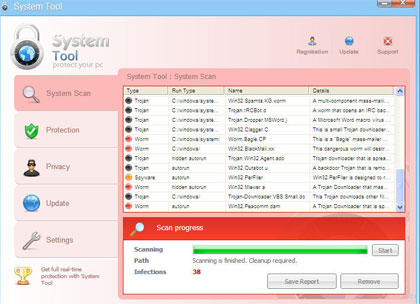
Screen Shot Image:
Image of System Tool
Alias: System Tool 2011
Damage Level: Medium
Systems Affected: Windows 9x, 2000, XP, Vista, Windows 7

System Tool Removal Procedures

Manual Removal:
1. Stop System Tool process by pressing Ctrl+Alt+Del. Windows Task Manager will open. Look for the following process:
(random characters).exe
2. Update your installed anti-virus program.
3. Run a full system scan and clean/delete all detected infected file(s). A manual removal of virus-related files should also be performed.
4. Edit Windows registry and delete System Tool entries as shown below. [how to edit registry]
5. Exit registry editor.
6. Remove System Tool start-up entry by going to Start > Run, type msconfig on the “Open” dialog box. System Configuration Utility will open. Go to Startup tab and uncheck the following Startup item(s):
(random characters).exe
7. Click Apply and restart the computer.
System Tool Removal:
In order to completely remove the threat from a computer, it is best to download and run Malwarebytes . Sometimes, Trojans will block the downloading and installation of MBAM. If this happens, download it from a clean computer and rename the executable file before executing on the infected computer.Anti-Malware
Using Portable SuperAntiSpyware:
To thoroughly clean a computer, it is best to do a separate scan of another security program so that other infected files not detected by anti-virus application can be remove as well. Download and run SuperAntiSpywarePortable Scanner.
Technical Details and Additional Information:
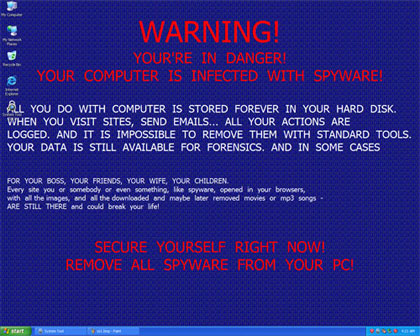
System Tool virus will modify desktop wallpaper and set an image as the dafault, it will contain the following messages:
WARNING!
YOUR’RE IN DANGER!
YOUR COMPUTER IS INFECTED WITH SPYWARE!
ALL YOU DO WITH COMPUTER IS STORED FOREVER IN YOUR HARD DISK.
WHEN YOU VISIT SITES, SEND EMAILS… ALL YOUR ACTIONS ARE LOGGED. AND IT IS IMPOSSIBLE TO REMOVE THEM WITH STANDARD TOOLS. YOUR DATA IS STILL AVAILABLE FOR FORENSICS. AND IN SOME CASES
Image of System Tool Warning
Malicious Files Added by System Tool:
%Temp%\[Random]
%UserProfile%\Start Menu\Programs\System Tool 2011.lnk
%UserProfile%\Start Menu\Programs\SystemTool2011.lnk
%UserProfile%\Start Menu\Programs\System Tool\System Tool 2011.lnk
%UserProfile%\Start Menu\Programs\System Tool\SystemTool2011.lnk
%UserProfile%\Desktop\System Tool 2011.lnk
%UserProfile%\Desktop\SystemTool2011.lnk
%systemdrive%\Users\All Users\Application Data\oHaKo00902
%systemdrive%\Users\All Users\Application Data\oHaKo00902\oHaKo00902
%SystemDrive%\Documents and Settings\All Users\Application Data\[Random Letters and Numbers]\[Random Letters and Numbers].exe
%SystemDrive%\Documents and Settings\All Users\Application Data\[Random Letters and Numbers]\[Random Letters and Numbers]
System Tool Registry Entries:
HKEY_CURRENT_USER\Software\Microsoft\Windows\CurrentVersion\RunOnce\”[Random Letters and Numbers]” = “%SystemDrive%\Documents and Settings\All Users\Application Data\[Random Letters and Numbers]\[Random Letters and Numbers].exe”


Thanks to,
http://www.precisesecurity.com/

Thursday, March 17, 2011

Microsoft Excel


Microsoft Excel


Microsoft
 Excel is a popular spreadsheet program that was developed by Microsoft. It is designed for computers that use the Windows operating system, and it can also be used on computers that use Mac OS as well. It has an easy to use interface with a number of tools that can make creating a spreadsheet fast and simple. This combined with a powerfulmarketing campaign has made Excel one of the most popular software programs in the world. Excel is typically bundled in theMicrosoft Office package of programs.

Excel is not the first spreadsheet program to be produced by Microsoft. A spreadsheet program called Multiplan was first released by the company in 1982, but it eventually lost
 marketshare due to the release of Lotus 1-2-3. Because of this, Microsoft decided to create a spreadsheet program that could effectively compete against the dominance of Lotus. The very first version of Excel was introduced in 1985, and was available on the Mac. The first version for Windows would be released two years later. Because Lotus didn't bring their spreadsheet program to Windows quickly enough, Excel begin to gain a larger share of the market. By 1988 Excel had surpassed 1-2-3, and it is one of the factors behind the success of Microsoft as a software company.

The latest version of the software is Excel 11, and it is part of the Microsoft
 Office 2003 bundle. An Excel file will come in the form of .xls. A number of changes can be made to the interface of the program, but the GUI will always be composed of rows and cells. Information can be placed in cells which will have an effect on the data that may be present in other cells. In addition to this, Excel gives the user a large amount of control over the look of cells and the information that is placed in them. Both Microsoft Word and PowerPoint were designed to conform to Excel.

The introduction of Visual Basic with Excel allowed a number of tasks to be automated. Since 1993, Visual Basic has become an integral part of Excel, along with the introduction of the integrated development environment. However, the automated properties of Excel with Visual Basic has caused a number of macro viruses to be created, though many of them are now blocked by standard antivirus programs. Microsoft also allows users to disable the use of macros if they choose to, and this has largely eliminated the problem.

While Microsoft Excel was not well known during the late 1980s, it has now become the most widely spreadsheet software, though it is facing competition from a number of companies, most notably Google. Despite this, Microsoft has made a name for itself with the release of Excel, and next to Windows, it is one of the most well known software packages in the world. It has excellent calculation tools, and it can effectively be used for graphing as well. However, the software wouldn't have the dominance that it has today if it hadn't been for Multiplan, the predecessor that started it all.
 

Friday, March 11, 2011

Notebook or Desktop Computer -- Which Should You Choose?


Notebook or Desktop Computer -- Which Should You Choose?

On TV and in the movies, we see a lot of portable computers being used in homes and offices. Does that mean that's the trend? Is that what you should get?

Portable computers cost more, so unless you really have the need for one, you get a lot more computer for your money with a regular
 desktop PC. The main thing is portability. If you need a portable computer, get a laptop. ("Laptop," "portable," and "notebook" all refer to the same thing, by the way). Otherwise, adesktop computer is a better buy, and better ergonomically.

The Price Difference

You might wonder why laptops cost more than
 desktop computers with comparable features and power. That is largely because it is more expensive to manufacture laptops and their parts. For portable computer components, factors such as compactness, the amount of heat they generate, their weight, and power consumption are more important than they are for desktops. Those factors add to their manufacturing costs.

SpaceRequirements

While laptops are certainly compact, a desktop computer with a flat panel monitor can take up almost as little space. While called a "desktop" computer, the computer itself is most often kept on the floor. That leaves just the monitor, keyboard and mouse on the desk, which is really very similar in footprint to a
 notebook computer.

A great way to further reduce the space taken up on the desktop computer is get a keyboard drawer to hold the keyboard and mouse. That way, they slide out of the way under the top of the desk when they aren't needed.

Be Mindful of Ergonomics
 

Ergonomics is the science of designing and arranging things so that people can interact with them more comfortably and safely. The basic ergonomic principals for computer use tell us that, 1) the keyboard should be as close to your lap level as possible (assuming you touch-type), 2) the monitor should be about arm's length in front of you, and 3) the top of the monitor should be at about your eye level. Try achieving that with a laptop computer! Two words: im-possible.


It is obvious then, that a desktop computer is much better ergonomically than a laptop is. For prolonged use, especially, you're much better off with a desktop computer.

And Don't Forget Usability

Another aspect of ergonomics is usability. Because of size constraints, laptops also are lower on the usability scale than
 desktop PCs are. For one thing, laptop keyboards lack the separate groupings of the different sets of keys with space between them. For another, there are fewer keys on a laptop's keyboard, so some of them have to perform double duty. On a standard keyboard, you don't have to deal with that.

Screen Resolution

Computer monitors -- the bulky ones, anyway -- can be set at different resolutions. In other words, you can change the fineness of the image on the screen. The range is typically 640x480 -- that is 640 pixel across and 480 pixels up and down -- to 800x600, 1024x768, or even higher. At 640x480, the icons and such appear quite large; at 1024x768, they are substantially smaller. The most common resolutions today for desktop computers are 800x600 and 1024x768.
 

Something They Don't Tell You

Laptop displays, on the other hand, have a fixed, or native, resolution. You can change the setting, but then the images and text don't look good. While people tend to think that bigger numbers are better, a higher screen resolution may not work as well for you. It may make everything too small to see comfortably.
 

Remember, the laptop's screen is smaller that a desktop's. While a typical desktop
 computer screen is 17" or so a laptop's is usually in the range of 12" to 15." That is a big difference. Make sure you can see everything clearly before choosing a high-resolution laptop.


Tuesday, March 8, 2011

Data Recovery Procedures For Hard Drives


Your computer's data is at risk. Whether you use a Mac or a PC, viruses, power surges, hackers, human error, natural disasters,hardware failures, and more are real everyday threats. To keep your data safe and sound, you will first need to back up your fileson a regular basis. Secondly, when hard drive failure does occur,data recovery is the only solution.

Of course it is ideal to back up data and avoid the complicated process that is data recovery altogether, but even when you take the necessary steps to prepare for hard drive damage, you might run into problems.

Here are some procedures to follow if you experience trouble.

If a program is not functioning well on your computer, turn the computer off! This may seem a simple task, but shutting down a computer at the moment you notice your hard drive to be working overtime – perhaps you hear unusual sounds (like "cleaning") – can prevent damage to the disk and data loss. If you let a failed hard drive run, it will eventually self-destruct. Damage to your disk is inevitable in this scenario.

If this is the case, unless you know exactly what you're doing, don't fix your computer yourself. Professional expertise is not a luxury in this situation – it is a must. Data recovery is a difficult and sensitive process requiring special tools and a clean environment. Not only will it be tremendously challenging to repair a hard drive on your own, but you might actually make matters worse and ensure irreversible data loss.

There is "do-it-yourself" data recovery software, but be cautious of things like this. With most computer problems of this nature, at-home instructions can be more dangerous than useful. Even if a company boasts that its products and instructions will handle your vulnerable data properly, it is important to be a skepticalconsumer.

A local service provider is the average solution. Repair can happen on your own premises and you can be assured that your computer is in good hands. However, there is always the possibility that your hard drive is beyond repair – even for experttechnicians – so be prepared to buy a new hard drive altogether; data recovery may not be an option any more

Monday, March 7, 2011

How Do Wireless Networks Work?

How Do Wireless Networks Work?

Wireless networks work using radio waves instead of wires to transmit data betweencomputers. That's the simple version. If you're curious to know what's going on in more detail, then it's all explained in this article.

Ones and Zeros.

I'm sure you know that computers transmit data digitally, using binary: ones and zeros. This is a way of communicating thattranslates very well to radio waves, since the computer can transmit ones and zeros as different kinds of beep. These beeps are so fast that they're outside a human's hearing range -- radio waves that you can't hear are, in fact, all around you all the time. That doesn't stop a computer from using them, though.

Morse Code.

The way it works is a lot like Morse code. You probably already know that Morse code is a way of representing the alphabet so that it can be transmitted over radio using a dot (short beep) and a dash (long dash). It was used manually for years, and became a great way of getting information from one place to another with the invention of the telegraph. More importantly for this example, though, it is a binary system, just like a computer's ones and zeros.

You might think of wireless networking, then, as being like Morse code for computers. You plug a combined radio receiver andtransmitter in, and the computer is able to send out its equivalent of dots and dashes (bits, in computer-speak) to get your data from one place to another.

All About Frequencies.

You might wonder, though, how the computer could possibly transmit enough bits to send and receive data at the speed it does. After all, there must be a limit on how much can be sent in a second before it just becomes useless nonsense, right? Well, yes, but the key to wireless networking is that it gets around this problem.

First of all, wireless transmissions are sent at very highfrequencies, meaning that more data can be sent per second. Most wireless connections use a frequency of 2.4 gigahertz (2.4 billion cycles per second) -- a similar frequency to mobile phones and microwave ovens. As you might know, though, a frequency this high means that the wavelength must be very short, which is why wireless networking only works over a limited area.

In addition, wireless networks make use of a technique known as 'frequency hopping'. They use dozens of frequencies in the range they are given, and constantly switch between them. This makes wireless networks more immune to interference from other radio signals than they would be if they only transmitted on one frequency.

Access Points.

The final step is when it comes to all the computers on a network sharing Internet access. This is done using a special piece of wireless equipment called an access point. Access points are more expensive than wireless cards for one computer, as they contain radios that are capable of talking to around 100 computers at the same time, and sharing out access to the Internet between them. Dedicated access points are only really essential for larger networks, though -- if you only have a few computers, it is possible to use one of them as the access point, or you could just get a wireless router.

They Understand Each Other.

That's all well and good, then, but how does wireless equipment made by entirely different companies manage to work together when this is all so complicated? Well, the answer is that there are standards that all wireless devices follow. These standards are technically called the 802.11 standards, and are set by the IEEE (Institute of Electrical and Electronics Engineers). It is thanks to people sticking to their standards that wireless networking is so easy and cheap to use today.

You Don't Need to Worry.

If all this talk of frequencies has you a little worried, you don't need to be -- wireless networking hardware and software handles all of this automatically, without you needing to do a thing. Don't think that you're going to have to tell one wireless device what frequency another is using, because it's just not going to happen, alright? Wireless networking, for all its complicated workings, is really far more simple to use than you'd ever expect.