Friday, October 14, 2011

Phishing Attacks on Email Services


On Going Phishing Attacks on Email Services.

Series of phishing attacks aimed at stealing Gmail and Yahoo user log-in information is on rise. I believe that the attacks were a part of a larger campaign aimed at stealing user data and compromise computer systems.

If the users put the Login details on such phishing links, then the information get transferred to the attackers. With the information in hand, the attacker can log in to the account to change certain settings that allow them to monitor all outgoing mail. The Gmail attackers entered the email address that they control under the “forwarding and delegation settings,” which allows them to send and receive email messages without having to ever log back into the accounts.

Our team came across few links which are carrying out the phishing attacks on Gmail and Yahoo mail.


On further analysis of the phishing link: hxxp://consciousliving.me/gmail.html. We noticed that the domain consciousliving.me is specially be using for carried out the phishing attacks.


This domain has many others phishing pages related to Gmail, Yahoo, Facebook etc. Attackers may be also updating this domain for more phishing pages to carry out more attacks on other online services.

Quick Heal takes care of such attacks and blocks such phishing pages to protect its users.
---------------------------------------------------------------------------------------------------------------------------

Originally Posted By  Ravindra Deotare @ Quick Heal Blogs on Thursday, october 13. 2011 Thanks and regards goes to him.


Thursday, October 13, 2011

Windows 8


First Look at What’s New in Windows 8*

Microsoft showed us a more in-depth look at Windows 8 today, from the previously mentioned tablet interface to the traditional mouse-and-keyboard desktop. Here's what it looks like.
Microsoft's "re-imagining" of Windows 8 is focused very heavily on a new, Metro-style touch-based interface. However, they make a big deal of saying that it's just as usable with a mouse and keyboard—and no matter what device you're on, you can switch between the simple Metro interface and the traditional Windows desktop to fit whatever your needs are at that given moment.

Performance Increases

First Look at What's New in Windows 8One of the issues that's been on our minds since they previewed this new interface was whether this will keep bogging Windows down with more running processes, and whether running a full Windows desktop on a low-powered tablet was really a good idea (after all, we've seen Windows run on netbooks).
Performance was the first thing they addressed today: Windows 8 actually has better performance than Windows 7, even with this metro interface running on top of a desktop. Tablet users and netbook users should notice a fairly significant performance increase with Windows 8. What it really "feels" like in real-world usage remains to be seen, but you can see a comparison between a task manager running on both operating systems above—which makes us pretty hopeful. Furthermore, any of your tablet-based apps will suspend themselves when you jump into the traditional desktop, so they don't take up any of your resources.

The Lock Screen

First Look at What's New in Windows 8Windows 8's lock screen is pretty much what you'd expect: it's got a beautiful picture along with a few little widgets full of information, like the time, how many emails you have, and so on. However, after swiping to unlock, Windows 8 shows off some pretty neat touch-based features, particularly a "picture password" feature. Instead of using a PIN or a lock pattern to get into your system, you swipe invisible gestures using a picture to orient yourself (in the example they showed, the password was to tap on a persons nose and swipe left across their arm). Android modders might find this similar to CyanogenMod's lock screen gestures.

The Home Screen

First Look at What's New in Windows 8The home screen is very familiar to anyone who's used Windows Phone 7. You've got a set of tiles, each of which represents an application, and many of which show information and notifications that correspond to the app. For example, your email tile will tell you how many unread emails you have (and who they're from), your calendar tile will show upcoming events, your music tile will show you what's playing, and so on. You can also create tiles for games, contacts, and even traditional Windows apps that will pull you into the Windows desktop. The tablet-optimized apps are all full screen and "immersive", though, and you can rearrange their icons on the home screen easily (just as you would on any other tablet platform).

Running Apps

First Look at What's New in Windows 8Running a basic app works as you expect—you tap on its home screen icon and it goes full screen. The browser has lots of touch-based controls, like pinch to zoom and copy and paste, and apps can also share information one another easily. To do so, you just need to select text in the browser or choose a photo in their cloud-based photo app and hit the "Share" button—you'll then be able to pick an app to which you want to send that text or picture, and work with it from there. For example, you can share photos to Facebook, send text from a web page in an email, and so on.
None of this is brand new to touch-based platforms, but what is new is the ability to not only multitask, but run these apps side by side. Say you want to watch a video and keep an eye on your news feed at the same time. Just like in Windows 7 for the desktop, you can dock an app to one side of the screen while docking another app at the opposite side, which is a seriously cool feature. Imagine being able to IM and play a game at the same time, or browse the web while writing an email. It's a fantastic way to fix one of the big shortcomings of mobile OSes, thus allowing you to ignore the full desktop interface more often and stay in the touch-friendly, tablet view.

The App Store

First Look at What's New in Windows 8The Windows App Store looks much like the home screen, with tiles that correspond to different categories and featured apps. From there, you can look at a more detailed list of the available apps in a given section. And, the store contains not only touch-based apps for the tablet interface, but some of the more traditional desktop Windows apps you're used to, so you have one portal to discover all your Windows apps no matter what interface you're using.

Windows Live's Cloud Syncing

First Look at What's New in Windows 8Windows Live is taking center stage as the backend for all of Windows 8's cloud syncing abilities. Your address book, photos, SkyDrive data, and even data within third-party apps can sync up to the cloud with Windows Live. The address book also syncs with other services like Facebook and Twitter as well. You can even sync all of your settings from one Windows 8 PC to another. Just sign onto your Windows 8 with a Windows Live ID and you'll get all your themes, languages, app settings, taskbar, and other preferences will show right up. It's a pretty neat feature if you have multiple Windows 8 PCs and don't want to set them all up separately—just a few taps and you've got all your preferences ready to go.

A New Task Manager

First Look at What's New in Windows 8Microsoft's finally redesigned the task manager, and it looks pretty great. You have a very simple task manager for basic task killing, but if you're a more advanced user, you can bring up the detailed task manager filled with information on CPU and RAM usage, Metro app history, and even startup tweaking—so you can get rid of apps that launch on startup without going all the way into msconfig.

Windows Explorer

First Look at What's New in Windows 8They didn't show us a super in-depth look at the new Windows Explorer, but we did get a little peek. Most of it isn't new information: we'll have native ISO mounting in Windows Explorer, a new Office-style ribbon, and a one folder up button like the old days of XP (thank God). It also has a really cool "quick access" toolbar in the left-hand corner of the title bar, that gives you super quick access to your favorite buttons from the ribbon.

Other Features

First Look at What's New in Windows 8Along with these cool features, Windows 8 also comes with other features we've come to know and love in our mobile OSes. It's got system-wide spellchecking, so you don't have to rely on a specific app to keep your writing top-notch, as well as a system-wide search feature, that lets you search anything from your music library to your contacts to the web itself. It also has a really cool feature for desktop users that lets your run the Metro UI on one monitor while running the traditional desktop on the other.
It also has a really cool feature called "refresh your PC", where you can do a clean install with the tap of a button. Whether you're selling your machine or just want a cleaner, faster installation of Windows, you can do it all in one click. You can even set refresh points, similar to restore points, so you can refresh your PC to the way it was at a certain point in time.

This is still just a small preview of Windows 8; we know there's a lot more coming, but this is what they showed us today. Got a feature you think is really neat? Share your thoughts about the upcoming OS in the comments.
-------------------------------------------------------------------------------------------------------------
*Originally Posted By Whitson Gordon @ http://lifehacker.com 
All thanks and regards goes to him

Friday, August 19, 2011

മോട്ടോറോളയെ ഗൂഗിള്‍ സ്വന്തമാക്കുന്നു. ആന്‍ട്രോയിടിന്‍റെ രക്ഷയ്ക്ക്.

മോട്ടറോളയെ ഗൂഗിള്‍ സ്വന്തമാക്കുന്നത് ആന്‍ഡ്രോയിഡിന്റെ രക്ഷയ്ക്ക്‌


'മോട്ടറോള മൊബിലിറ്റി'യെന്ന മൊബൈല്‍ കമ്പനിയെ 12.5 ബില്യണ്‍ ഡോളര്‍ (ഏതാണ്ട് 56000 കോടി രൂപ) മുടക്കി ഗൂഗിള്‍ ഏറ്റെടുക്കുന്നതെന്തിന്. അതിന് ധാരണയായെന്ന വാര്‍ത്ത പുറത്തുവന്നപ്പോള്‍ പലരും അത്ഭുതപ്പെട്ടു. മൊബൈല്‍ പ്ലാറ്റ്‌ഫോമായ ആന്‍ഡ്രോയിഡിന്റെ രക്ഷയ്ക്കാണ് ഗൂഗിള്‍ ഇങ്ങനെയൊരു ഡീലിന് പുറപ്പെട്ടതെന്ന് നിരീക്ഷകര്‍ വിലയിരുത്തുന്നു.

ആന്‍ഡ്രോയിഡ് ഫോണുകള്‍ക്കെതിരെ ആപ്പിളും മൈക്രോസോഫ്ടും നടത്തുന്ന പേറ്റന്റ് നടപടികള്‍ക്ക് ഒരു പരിധി വരെ തടയിടാനും, പകരം പ്രതിയോഗികളെ പ്രതിരോധത്തിലാക്കാനും ഗൂഗിളിനെ സഹായിക്കുന്ന നടപടിയാണ് മൊട്ടറോളയെ സ്വന്തമാക്കുന്ന നടപടി.

ടെക് രംഗത്ത് ബൗദ്ധീകസ്വത്തവകാശത്തിന്റെ പേരില്‍ വലിയ നിയമയുദ്ധങ്ങളാണ് ഇപ്പോള്‍ അരങ്ങേറുന്നത്. പ്രത്യേകിച്ചും മൊബൈല്‍ സങ്കേതങ്ങളുമായി ബന്ധപ്പെട്ട പേറ്റന്റുകളുടെ പേരില്‍. പേറ്റന്റുള്ള ഐഫോണ്‍ സങ്കേതങ്ങള്‍ ആന്‍ഡ്രോയിഡ് ഫോണുകള്‍ കോപ്പിയടിക്കുന്നുവെന്ന് ആപ്പിള്‍ ആരോപിക്കുമ്പോള്‍, ആപ്പിളിനെതിരെയും ഗൂഗിളിനെതിരെയും പേറ്റന്റുകളുടെ പേരില്‍ മൈക്രോസോഫ്ട് രംഗത്തുണ്ട്.

ഈ സാഹചര്യത്തില്‍, മൊബൈല്‍ സങ്കേതങ്ങളുമായി ബന്ധപ്പെട്ട് മോട്ടറോള മൊബിലിറ്റിയുടെ പക്കലുള്ള 17000 പേറ്റന്റുകള്‍ ഗൂഗിളിന് സ്വയരക്ഷയ്ക്ക് കൂടുതല്‍ അവസരമൊരുക്കും. ആന്‍ഡ്രോയിഡ് ഇക്കോസിസ്റ്റം സംരക്ഷിക്കാനും അതുവഴി ആന്‍ഡ്രോയിഡ് ഫോണ്‍ പുറത്തിറക്കുന്ന കമ്പനികളെ സഹായിക്കാനും ഗൂഗിളിനാകും.

മാത്രമല്ല, സ്മാര്‍ട്ട്‌ഫോണ്‍ രംഗത്ത് മത്സരം കൂടുതല്‍ ശക്തമാകാനും ഗൂഗിളിന്റെ നീക്കം കാരണമാകുമെന്ന് വിലയിരുത്തപ്പെടുന്നു. മൊബൈല്‍ ഹാര്‍ഡ്‌വേര്‍ രംഗത്തേക്കും സാന്നിധ്യം വ്യാപിപ്പിക്കാന്‍ ഗൂഗിളിന് മോട്ടറോള മൊബിലിറ്റി അവസരമൊരുക്കും.

മൊബൈല്‍ രംഗത്ത് ഇത്രകാലവും ഗൂഗിളിന്റെ പങ്കാളികളായിരുന്ന സാംസങ്, എച്ച്ടിസി തുടങ്ങിയ കമ്പനികള്‍ക്ക്, ഗൂഗിളിന്റെ പുതിയ നീക്കം അലോസരമുണ്ടാക്കാന്‍ സാധ്യതയുണ്ടെന്നും ചൂണ്ടിക്കാണിക്കപ്പെടുന്നു. കാരണം, ഈ കമ്പനികളുടെ പങ്കാളി മാത്രമാകില്ല ഇനി ഗൂഗിള്‍, ഇവയോട് മൊബൈല്‍ രംഗത്ത് മത്സരിക്കുന്ന കമ്പനി കൂടിയാകും.

ഗൂഗിളിന്റെ ചില പങ്കാളികളും ആപ്പിളും തമ്മില്‍ പേറ്റന്റിന്റെ പേരില്‍ ബലാബലം തുടരുന്നതിനിടെയാണ്, ആന്‍ഡ്രോയിഡിനെ കൂടുതല്‍ സുരക്ഷിതമാക്കാനുള്ള നീക്കം ഗൂഗിള്‍ നടത്തിയിരിക്കുന്നത്.

സാംസങ് പുറത്തിറക്കിയ ഗാലക്‌സി ടാബ് 10.1 എന്ന ടാബ്‌ലറ്റിന്റെ യൂറോപ്പിലെ വില്‍പ്പന കോടതിവിധി വഴി തത്ക്കാലത്തേക്ക് തടഞ്ഞ ആപ്പിളിന്റെ നടപടി ചോദ്യംചെയ്യപ്പെട്ടുകൊണ്ടിരിക്കുകയാണ്. വിധി പുറപ്പെടുവിച്ച ജര്‍മന്‍ കോടതിക്ക് അതിന് അധികാരമുണ്ടോ എന്ന നിലയ്ക്കാണ് കാര്യങ്ങളുടെ പോക്ക്. ഐപാഡിന്റെ മാതൃകയെ അന്ധമായി അനുകരിക്കുന്നുവെന്ന് ചൂണ്ടിക്കാട്ടിയാണ് ഗാലക്‌സി ടാബിനെതിരെ കോടതി വിധി നേടാന്‍ ആപ്പിളിന് സാധിച്ചത്.

സ്മാര്‍ട്ട്‌ഫോണ്‍, ടാബ്‌ലറ്റ് രംഗത്തെ തങ്ങളുടെ പേറ്റന്റ് കൈയേറിയെന്ന് കാണിച്ച്, യു.എസ്. ഇന്റര്‍നാഷണല്‍ ട്രേഡ് കമ്മീഷന് മുന്നില്‍, ഗൂഗിളിന്റെ മറ്റൊരു പങ്കാളിയായ എച്ച്ടിസിക്കെതിരെ ആപ്പിള്‍ പരാതി സമര്‍പ്പിച്ചത് ജൂലായ് രണ്ടാമത്തെ ആഴ്ചയാണ്.

അതിന് തിരിച്ചടിയെന്ന നിലയില്‍ ആപ്പിളിനെതിരെ അമേരിക്കയില്‍ എച്ച്ടിസി നിയമനടപടി ആരംഭിച്ചു. തങ്ങളുടെ പേറ്റന്റുകളില്‍ ആപ്പിള്‍ കടന്നുകയറുന്നുവെന്ന് കാണിച്ചാണ് എച്ച്ടിസിയുടെ നീക്കം. ഐഫോണുകളും ഐപാഡുകളും ഐപോഡുകളും മാക് കമ്പ്യൂട്ടറുകളും അമേരിക്കയില്‍ നിന്ന് കയറ്റുമതി ചെയ്യുന്നത് തടയുകയാണ് എച്ച്ടിസിയുടെ ഉദ്ദേശം.
 Original News@Mathrubhumi Online

Wednesday, April 27, 2011

Fake BitDefender 2011


Fake BitDefender 2011

21 APRIL 2011
Overall Risk Level:
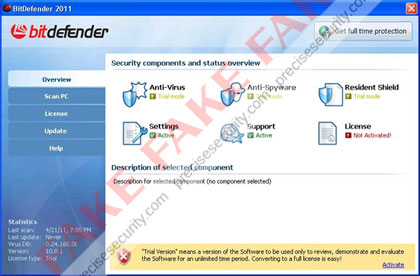
Fake BitDefender 2011 is a misleading security software that will mimic the legitimate program in order to deceive computer users. Sometimes called as the Fake Bit Defender 2011 virus, this one was included in the lists of rogue security applications that were created specifically to be sold via unfair marketing method. The real BitDefender 2011 can be downloaded from bitdefender.com web site and must be installed manually, while the rogue one’s will be dropped on to computers and be installed without users consent. Also the legitimate one is offered in two variants namely BitDefender Antivirus Pro, BitDefender Total Security 2011 and BitDefender Internet Security 2011. These variants offers different levels of protection.
It is good to know that fake BitDefender 2011 can penetrate a computer without being detected. This is because it uses a technique that will hide itself on the system by injecting a code on legitimate Windows process. A Trojan is also responsible why the fake BitDefender 2011 can manipulate a system without hindrance from any security applications installed. Modifications can be performed on the registry that will allow itself to run when Windows is started. Removing BitDefender 2011 virus is the best idea to prevent further harm it may cause to compromised computer. Use only legitimate anti-malware programs to scan the computer and remove fake BitDefender 2011 together with all the files residing on the system.
Screen Shot Image:
Alias: Bit Defender 2011
Damage Level: Medium
Systems Affected: Windows 9x, 2000, XP, Vista, Windows 7

BitDefender 2011 Virus Removal Procedures

Manual Removal:
1. Press Ctrl+Alt+Del on keyboard to stop process associated to “BitDefender 2011″. When Windows Task Manager opens, go to Processes Tab and find and end the following process:
(random characters).exe
2. You need to update your installed antivirus application to have the latest database.
3. Thoroughly scan the computer and any detected threats must be removed. If removal is prohibited, it is best to quarantine the infected item. Manually locating and deleting of malicious files should also be performed. Please see files below that are related to BitDefender 2011 Virus.
4. Registry entries created by BitDefender 2011 must also be remove from the Windows system. Please refer below for entries associated to the rogue program. [how to edit registry]
5. Exit registry editor.
6. Get rid of BitDefender 2011 start-up entry by going to Start > Run, type msconfig on the “Open” dialog box. A windows containing System Configuration Utility will be launched. Go to Startup tab and uncheck the following Start-up item(s):
(random characters).exe
7. Click Apply and restart the computer.
BitDefender 2011 Removal Tool:
In order to completely remove the threat from a computer, it is best to download and run Malwarebytes Anti-Malware. Sometimes, Trojans will block the downloading and installation of MBAM. If this happens, download it from a clean computer and rename the executable file before executing on the infected computer.
Using Portable SuperAntiSpyware:
To thoroughly clean a computer, it is best to do a separate scan of another security program so that other infected files not detected by anti-virus application can be remove as well. Download and runSuperAntiSpyware Portable Scanner.

Technical Details and Additional Information:

Malicious Files Added by Fake BitDefender 2011:
c:\Program Files\BitDefender 2011\
c:\Program Files\BitDefender 2011\bitdefender.exe
c:\Documents and Settings\All Users\Start Menu\BitDefender 2011\
c:\Documents and Settings\All Users\Start Menu\BitDefender 2011\BitDefender 2011.lnk
%AllUsersProfile%\Start Menu\BitDefender 2011\Uninstall.lnk
%UserProfile%\Desktop\BitDefender 2011.lnk
%Temp%\srvED4.ini
%Temp%\srvED4.tmp
Fake BitDefender 2011 Registry Entries:
HKEY_CURRENT_USER\Software\MonEC2
HKEY_USERS\.DEFAULT\Software\Microsoft\Windows\CurrentVersion\Internet Settings “ProxyEnable” = ‘0′
HKEY_CURRENT_USER\Software\Microsoft\Windows\CurrentVersion\Run “BitDefender 2011″ = ‘C:\Program Files\BitDefender 2011\bitdefender.exe’
HKEY_LOCAL_MACHINE\SOFTWARE\Microsoft\Windows NT\CurrentVersion\Image File Execution Options\chrome.exe “Debugger” = ‘msiexecs.exe -sb’
HKEY_LOCAL_MACHINE\SOFTWARE\Microsoft\Windows NT\CurrentVersion\Image File Execution Options\firefox.exe “Debugger” = ‘msiexecs.exe -sb’
HKEY_LOCAL_MACHINE\SOFTWARE\Microsoft\Windows NT\CurrentVersion\Image File Execution Options\iexplore.exe “Debugger” = ‘msiexecs.exe -sb’
HKEY_LOCAL_MACHINE\SOFTWARE\Microsoft\Windows NT\CurrentVersion\Image File Execution Options\opera.exe “Debugger” = ‘msiexecs.exe -sb’
HKEY_LOCAL_MACHINE\SOFTWARE\Microsoft\Windows NT\CurrentVersion\Image File Execution Options\safari.exe “Debugger” = ‘msiexecs.exe -sb’
HKEY_LOCAL_MACHINE\SOFTWARE\Microsoft\Windows\CurrentVersion\Internet Settings\5.0\User Agent\Post Platform “WinNT-EVI 21.04.2011″


Wednesday, April 20, 2011

Clean This


Clean This

20 MARCH 2011
Overall Risk Level: This entry has a rating of 2
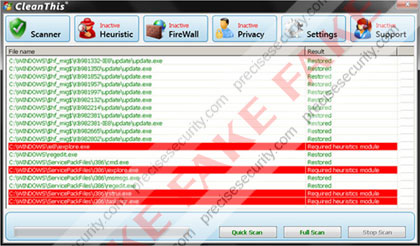
Clean This or also known as the CleanThis virus is believed to be another variant of widely-spread rogue application called Think Point. Clean This will be introduced as a real anti-virus application on web sites that were created for promotional purposes. An associated Trojan is also propagated earlier to infect web sites and build them to automatically run a virus scan on visitors computer. This online scan will provide fake detection and advise users to download and install a copy of Clean This program. Innocent users may not easily identify it as a threat because it will pretend to care for the system and was created to have a pleasant graphical user interface. Most of all it may turn out that it was part of the Windows operating system.
Victims may suffer from obstruction in using the PC when Clean This virus starts to display excessive alerts and taskbar warning messages. It will also block any programs from running and declared that the file is infected. An advise to clean the computer will constantly pop-up, if executed, a new browser window will open and suggest to buy the registration key of Clean This by paying using credit card information. Don’t get deceived by this rogue application, start scanning the computer with the recommended security application below. This was known to remove any forms of malicious software including Clean This virus.
Screen Shot Image:
Damage Level: Medium
Systems Affected: Windows 9x, 2000, XP, Vista, Windows 7

CleanThis Removal Procedures

Manual Removal:
1. Press Ctrl+Alt+Del on keyboard to stop process associated to “CleanThis”. When Windows Task Manager opens, go to Processes Tab and find and end the following process:
(hotfix.exe)
2. You need to update your installed antivirus application to have the latest database.
3. Thoroughly scan the computer and any detected threats must be removed. If removal is prohibited, it is best to quarantine the infected item. Manually locating and deleting of malicious files should also be performed. Please see files below that are related to CleanThis Virus.
4. Registry entries created by CleanThis must also be remove from the Windows system. Please refer below for entries associated to the rogue program. [how to edit registry]
5. Exit registry editor.
6. Get rid of CleanThis start-up entry by going to Start > Run, type msconfig on the “Open” dialog box. A windows containing System Configuration Utility will be launched. Go to Startup tab and uncheck the following Start-up item(s):
(hotfix.exe)
7. Click Apply and restart the computer.
CleanThis Removal Tool:
In order to completely remove the threat from a computer, it is best to download and run Malwarebytes Anti-Malware. Sometimes, Trojans will block the downloading and installation of MBAM. If this happens, download it from a clean computer and rename the executable file before executing on the infected computer.
Using Portable SuperAntiSpyware:
To thoroughly clean a computer, it is best to do a separate scan of another security program so that other infected files not detected by anti-virus application can be remove as well. Download and runSuperAntiSpyware Portable Scanner.
Scan with Norton Power Eraser:
A free removal tool from Norton Antivirus was developed to remove unfamiliar threats without using the traditional AV signatures. Download the tool and start scanning with Norton Power Eraser.

Technical Details and Additional Information:

Malicious Files Added by CleanThis:
%UserProfile%\Application Data\gog.exe
%UserProfile%\Application Data\cleanthis.exe
%UserProfile%\Application Data\install
CleanThis Registry Entries:
HKEY_CURRENT_USER\Software\PAV
HKEY_CURRENT_USER\Software\Microsoft\Windows\CurrentVersion\Run “cleanthis”
HKEY_CURRENT_USER\Software\Microsoft\Windows NT\CurrentVersion\Winlogon “Shell” = “%Documents and Settings%\[UserName]\Application Data\gog.exe”


Thanks to 

Thursday, April 7, 2011

Security breaches serve as a warning


Security breaches serve as a warning


Some big IT security breaches since the start of the year three involving EU institutions, and two possibly affecting me serve as warning that this is the era of the professional hackers and cyber thief.

When large, supposedly well-protected systems can be successfully attacked, then every business and organisation should consider themselves vulnerable. There is no skimping on spending on more protection and smarter IT security.

Data theft is becoming more common TripAdvisor told me recently, in an email from its CEO informing me that “an unauthorised third party” had stolen part of the online travel company's member email list. The company shut down the vulnerability and noted that no passwords were stolen. It warned that I could receive some more spam as a result of the theft.

“The reason we are going directly to you with this news is that we think it's the right thing to do,” the company's CEO said. “As a TripAdvisor member, I would want to know. Unfortunately, this sort of data theft is becoming more common across many industries, and we take it extremely seriously.”

Then this week I was told by Hilton Hotels that their loyalty programme had been broken into and not to “open e-mails from senders” I didn't know.

Both breaches fortunately has a very minor impact, if any, on my data. However, I would rather that such disclosures from companies become the norm, and even a legal requirement.

A bigger impact was felt across Europe in January this year, when the EU had to shut down its innovative carbon trading market, which allows companies to buy and sell their carbon emissions quotas.

The shutdown occurred after cyber thieves stole credits worth about $9.4 million from the Czech Republic's registry. They also broke into the EU Emissions Trading System in Austria, Poland, Greece and Estonia, raising the amount to $43 million.

The Wall Street Journal said that the Czech break-in occurred after an anonymous bomb threat was made by telephone to police, claiming there were explosives at the registry's location in Prague.

The building was cleared and no devices were found. During the time the register was unmonitored, its computer system was broken into and the thieves executed the illegal trades.

According to other reports, the police are unlikely to catch the thieves as the money had been funnelled away through a maze of accounts. Three months later, 24 national registers have re-opened with supposedly even better security -- but how long will they be able to withstand a new onslaught? The system has an annual turnover of $127 billion.

Last month, the European Commission was itself attacked. It had to fight off a sustained digital attack on its e-mail and intranet systems on the eve of a summit of EU leaders. The European Parliament's separate system also suffered a similar cyber attack, which started on 24 March.

Parliament found out only after it examined its systems in the wake of the attack on the Commission. Its IT security noticed “abnormal levels of webmail activity, particularly overnight, when we wouldn't expect such activity”. Parliament had to shut down its webmail and some other external services. No one could access their accounts from outside.

The lessons for all IT security experts from these incidents are: be honest with clients, have a emergency contingency plan to shut down systems in case of a staff evacuation, and continually monitor your networks.

Finally, companies must keep spending to upgrade their systems and force your staff to continually follow security procedures, even annoying and mundane ones as changing their passwords.

The current “LisaMoon” attack on one million website pages is more common. The hijack redirects visitors of those websites to a fraudulent software sales operation. Most security companies say such attacks happen often, and those redirected should now know better than to input their credit cards when asked to pay for security software a fake company claims they need.

The attack inserted malicious code in the websites by gaining access to the servers behind them. Often, the vulnerability is due to websites not updating their backend. If you own a website and have not updated the backend in years, now is the time to do so.


Thanks Goes To,