 System Tool
Overall Risk Level: 
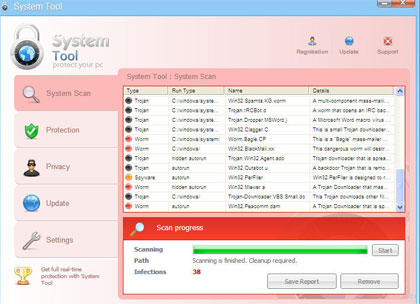
System Tool also called as the SystemTool 2011  virus is another deadly and widely-spread rogue security program in the making. A Trojan that is capable of penetrating a system by taking advantages of software and system vulnerabilities is being utilized to expand its contamination to as many computer as it can. When first hit with a System Tool virus, common symptoms may include browser redirects, homepage hijacking and disabled anti-virus program. Internet browser homepage will be pointed to a fake online virus scanner web page where it automatically runs a scan and produce fabricated results. Later, it will advise for a download of System Tool and endorse it as the only solution to get rid of detected threats on the system. If not clever enough, you may have this rogue program installed on the computer and will begin to encounter annoyances including excessive pop-up alerts and warning messages. A modification will also be made to registry that will allow a System Tool
  virus scan every time the computer is started.
virus is another deadly and widely-spread rogue security program in the making. A Trojan that is capable of penetrating a system by taking advantages of software and system vulnerabilities is being utilized to expand its contamination to as many computer as it can. When first hit with a System Tool virus, common symptoms may include browser redirects, homepage hijacking and disabled anti-virus program. Internet browser homepage will be pointed to a fake online virus scanner web page where it automatically runs a scan and produce fabricated results. Later, it will advise for a download of System Tool and endorse it as the only solution to get rid of detected threats on the system. If not clever enough, you may have this rogue program installed on the computer and will begin to encounter annoyances including excessive pop-up alerts and warning messages. A modification will also be made to registry that will allow a System Tool virus scan every time the computer is started.To avoid getting contracted with this rogue application. Avoid visiting web sites that are illegitimate, some will disguise as security and some will be presented as a multimedia web site that requires visitors to download a program to be able to watch online movies. If infected with rogue programs, immediately download and anti-malware application as advised below. This will automatically remove System Tool and other components hidden on the system.
Screen Shot Image:
Alias: System Tool 2011
Damage Level: Medium
Systems Affected: Windows 9x, 2000, XP, Vista, Windows 7
System Tool Removal Procedures
Manual Removal:
1. Stop System Tool process by pressing Ctrl+Alt+Del. Windows Task Manager will open. Look for the following process:
(random characters).exe
2. Update your installed anti-virus program.
3. Run a full system scan and clean/delete all detected infected file(s). A manual removal of virus-related files should also be performed.
4. Edit Windows registry and delete System Tool entries as shown below. [how to edit registry]
5. Exit registry editor.
6. Remove System Tool start-up entry by going to Start > Run, type msconfig on the “Open” dialog box. System Configuration Utility will open. Go to Startup tab and uncheck the following Startup item(s):
(random characters).exe
7. Click Apply and restart the computer.
System Tool Removal:
In order to completely remove the threat from a computer, it is best to download and run Malwarebytes  . Sometimes, Trojans will block the downloading and installation of MBAM. If this happens, download it from a clean computer and rename the executable file before executing on the infected computer.Anti-Malware
. Sometimes, Trojans will block the downloading and installation of MBAM. If this happens, download it from a clean computer and rename the executable file before executing on the infected computer.Anti-MalwareUsing Portable SuperAntiSpyware:
To thoroughly clean a computer, it is best to do a separate scan of another security program so that other infected files not detected by anti-virus application can be remove as well. Download and run SuperAntiSpyware Portable Scanner.
Portable Scanner. Technical Details and Additional Information:
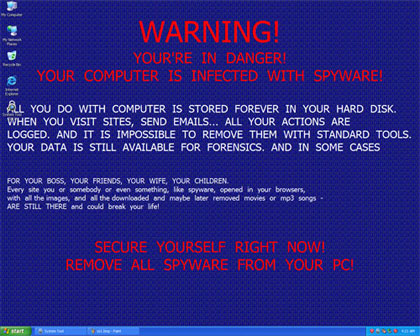
System Tool virus will modify desktop wallpaper and set an image as the dafault, it will contain the following messages:
WARNING!YOUR’RE IN DANGER!YOUR COMPUTER IS INFECTED WITH SPYWARE!ALL YOU DO WITH COMPUTER IS STORED FOREVER IN YOUR HARD DISK.WHEN YOU VISIT SITES, SEND EMAILS… ALL YOUR ACTIONS ARE LOGGED. AND IT IS IMPOSSIBLE TO REMOVE THEM WITH STANDARD TOOLS. YOUR DATA IS STILL AVAILABLE FOR FORENSICS. AND IN SOME CASES
Malicious Files Added by System Tool:
%Temp%\[Random]
%UserProfile%\Start Menu\Programs\System Tool 2011.lnk
%UserProfile%\Start Menu\Programs\SystemTool2011.lnk
%UserProfile%\Start Menu\Programs\System Tool\System Tool 2011.lnk
%UserProfile%\Start Menu\Programs\System Tool\SystemTool2011.lnk
%UserProfile%\Desktop\System Tool 2011.lnk
%UserProfile%\Desktop\SystemTool2011.lnk
%systemdrive%\Users\All Users\Application Data\oHaKo00902
%systemdrive%\Users\All Users\Application Data\oHaKo00902\oHaKo00902
%SystemDrive%\Documents and Settings\All Users\Application Data\[Random Letters and Numbers]\[Random Letters and Numbers].exe
%SystemDrive%\Documents and Settings\All Users\Application Data\[Random Letters and Numbers]\[Random Letters and Numbers]
System Tool Registry Entries:
HKEY_CURRENT_USER\Software\Microsoft\Windows\CurrentVersion\RunOnce\”[Random Letters and Numbers]” = “%SystemDrive%\Documents and Settings\All Users\Application Data\[Random Letters and Numbers]\[Random Letters and Numbers].exe”
Thanks to,


No comments:
Post a Comment